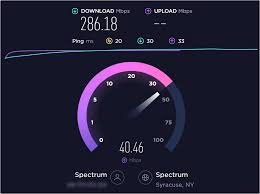
Knowing your actual internet speed helps you understand if you are getting the service you pay for. It can also help you diagnose issues like slow downloads, buffering videos, or lagging video calls. By regularly checking your internet speed, you can decide whether you need to upgrade your plan, fix a problem, or change your service provider.
Use Reliable Speed Test Websites
There are several trusted websites where you can quickly check your internet speed for free. Popular options include:
Speedtest.net by Ookla
Fast.com by Netflix
Google Speed Test (just search "internet speed test" on Google)
Steps to Test Your Internet Speed
Close all heavy downloads or streaming activities on your network.
Connect your device directly to Wi-Fi or using an Ethernet cable for more accurate results.
Visit a trusted speed test website.
Click the 'Go' or 'Start' button and wait for the results.
You’ll usually see three important results:
Download Speed: How fast data comes to your device (important for streaming and browsing).
Upload Speed: How fast you send data from your device (important for video calls and uploads).
Ping: Measures the delay or latency (important for gaming and live streaming).
Browsing and social media: 5–10 Mbps
HD Streaming: 15–25 Mbps
Online gaming: 25–50 Mbps
4K Streaming or heavy use: 50+ Mbps
For a family or shared home, speeds above 100 Mbps are recommended for a smooth experience.
Restart Your Router Regularly
Sometimes, a simple restart can refresh your connection and speed things up.
Place Your Router Correctly
Keep your router in a central, elevated position, away from walls and electronic appliances that might block the signal.
Use a Wired Connection
If possible, connect devices like PCs or gaming consoles directly to the router using an Ethernet cable for faster and more stable speeds.
Upgrade Your Router
Older routers may not support the latest internet speeds. Consider upgrading to a modern dual-band or mesh router.
Limit Background Devices
Too many connected devices can slow down your network. Disconnect devices not in use and set limits for background apps.
Upgrade Your Internet Plan
If your needs have increased (more devices, 4K streaming, work-from-home setups), upgrading to a faster internet plan may be necessary.
Use Wi-Fi Extenders
If your Wi-Fi signal is weak in certain areas of your home, a Wi-Fi repeater or extender can help improve coverage.
Checking your internet speed is quick and easy, and it gives you valuable insight into your network’s performance. With simple improvements like better router placement or upgrading equipment, you can enjoy faster, more reliable internet for everything you do online.


Comments